Sovelia Core PLM Release News
Sovelia Core PLM release news


On this page you can find all Sovelia Vault release news published in 2026. See below what's new in different versions.
The latest release is Sovelia Vault 27.4, published in October 2026.
October 12, 2026
Sovelia Vault 27.4 makes it easier to work with complex assemblies and their documentation. The new Assembly Overview shows an assembly together with its related documentation, so missing or outdated files are quicker to spot. Improved document collection gives more control when preparing Technical Data Packages. The release also adds support for multiple Job Processors, so each automated job can run on a Job Processor suited to it.
Finding out whether the documentation for a complex assembly is complete can require navigating between different files and locations. The new Assembly Overview brings the assembly structure and its related documentation together, making it easier to understand what information is available and where attention may be needed.
Users can review assemblies, subassemblies and parts in a hierarchical view together with their related drawings and other secondary documentation. Clear status information helps users quickly identify whether documentation is available, missing or out of date.
This gives engineering teams a clearer picture of the documentation associated with an assembly and makes it easier to identify missing or outdated information without checking files individually.
Sovelia Vault 27.4 provides more flexibility in how related secondary documentation can be found when collecting files for an assembly.
In addition to files stored alongside the related Vault file, users can locate relevant documentation from elsewhere in Vault and include attached secondary files and drawing lists.
More flexible search options make it easier to find the information needed for a complete documentation package, reducing the need to locate files manually.
The improved collection preview gives users more visibility and control over the documentation included in a Technical Data Package.
Before creating the package, users can review the files that Sovelia Vault has found, see where they are located in Vault and choose which files should be included. The preview also provides information about how each file was identified.
This makes it easier to verify the contents before creating the package and prepare the right documentation for the intended purpose with greater confidence.
For organizations running a high volume of automated Vault processes, Sovelia Vault 27.4 introduces the ability to distribute processing across multiple Job Processors.
Jobs can be assigned and distributed according to Job Categories, allowing available processing capacity to be used more flexibly while maintaining controlled execution of processes that need to run together.
In practice, this gives administrators more control over where automated work is processed, and makes it easier to add processing capacity as workloads grow.
Sovelia Vault 27.4 also includes several improvements designed to make administration and frequently used workflows more straightforward.
Administrative deployments now have greater flexibility through support for installer command-line parameters. Collect and Merge PDFs are also more readily available in the Vault user interface, making these frequently used commands easier to access.
The Collate PDFs command has been renamed Merge PDFs.
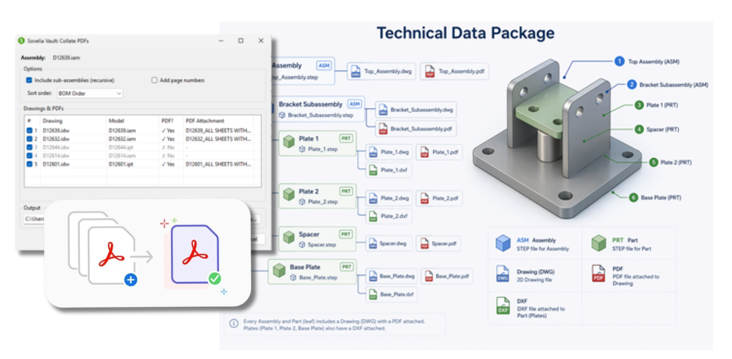
Sovelia Vault 27.4 adds .NET 10 support for Autodesk Vault 2026 and 2027 environments, helping customers maintain compatibility with current Autodesk technology environments.
One Sovelia Vault - new value released to all supported versions current + three back
August 28, 2026
Previously new workflows were added to the latest Autodesk version only which meant if you were on an previous Autodesk version.
Now you only need to update to the latest Sovelia Vault version to get the new workflows
This version is compatible with Autodesk Vault Professional 2027
May 8, 2026
With Sovelia Vault, you can now collect and publish all secondary files linked to an assembly to a selected location automatically, across the full assembly structure. Engineers no longer need to manually gather drawings, DXFs or STEP files for each component. This also ensures downstream teams always receive a complete and consistent data package.
May 8, 2026
It's now possible to reserve numbers from active File Numbering Schemes in Vault Professional.
You can now install both the Administration tool and the Vault Client extension with the same installer.
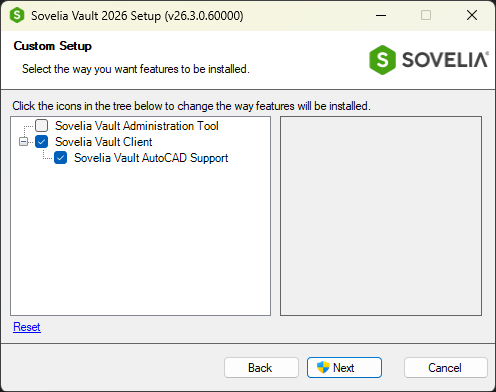
AutoCAD Support component is now loaded automatically without any AutoCAD configuration
AutoCAD support loads automatically—no setup required—so teams can get started instantly with a consistent, ready-to-use workflow.
Sovelia Core PLM release news
Sovelia Routing release news
Sovelia Inventor release news