Sovelia Core PLM Release News
Sovelia Core PLM release news


On this page you will find all Sovelia CAD Add-In release news published since the beginning of 2026.
Click below on the version you want to explore! The latest release is Sovelia CAD Add-in 27.1, published in November 2026.
November 9, 2026
With a smarter Clone command, a safer save dialog, more reliable BOM transfer and better model state handling, Sovelia CAD Add-in 27.1 means fewer manual fixes and more correct data reaching Sovelia the first time.
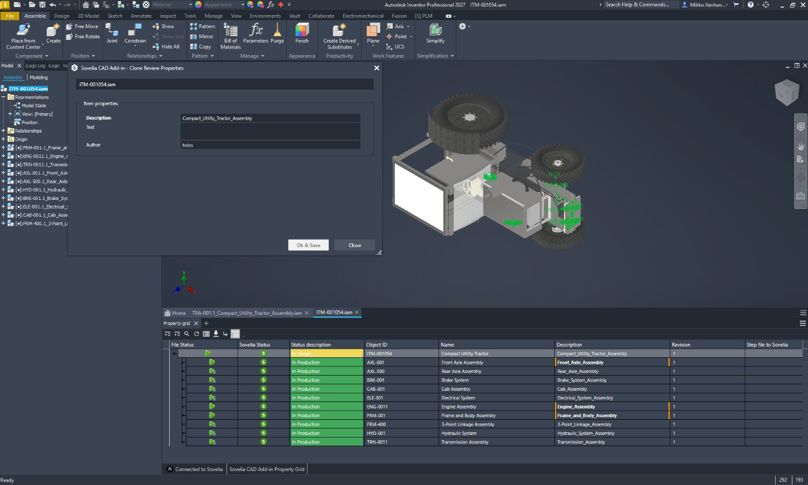
After cloning, users can review and edit the key Sovelia and file properties right away. The fields shown are set in the Inventor profile. When the cloned model has a related drawing, the drawing is now selected automatically, so it's easier to clone models and drawings together correctly.
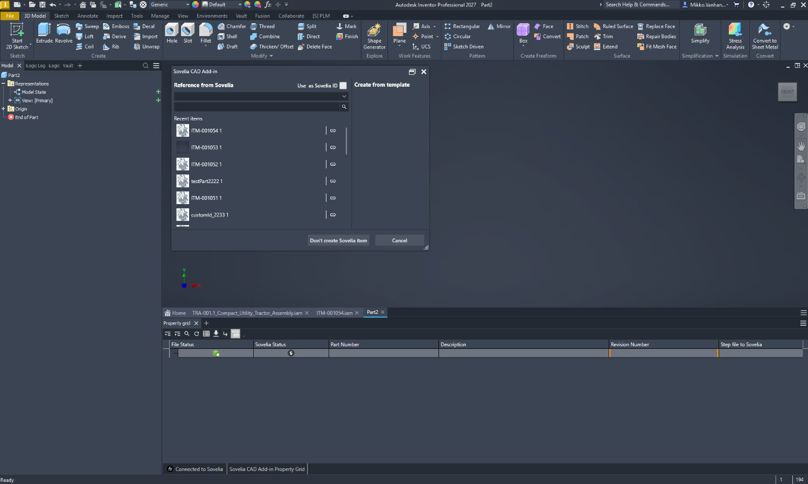
Canceling or closing the save dialog no longer changes the file. A new Don’t create Sovelia item option lets users mark files that shouldn't be managed in Sovelia, so it's clearer what goes into Sovelia.
Multi Send BOM handles structured view and checkout requirements better. It no longer asks you to enable structured view when it's already on. It also tells you clearly when files must be checked out before the BOM can be saved and sent.
Switching model states no longer causes errors. The property grid now shows the correct part number when part numbers depend on the active model state.
Running Publish from an iLogic rule now processes every part and subassembly in the assembly, so automated publishing works across the whole structure.
Version 27.1 supports Autodesk 2025.5, 2026.4 and 2027. It also includes:
Known Autodesk issue: With Inventor 2027 and Vault, some UI elements may go blank after assemblies / parts are checked in. Autodesk has published a workaround.
With support for Autodesk's 2027 product line, one installer for three Autodesk versions, and smarter validation during status changes, Sovelia CAD Add-in 27.0 makes upgrades easier.
Sovelia CAD Add-in 27.0 works with Autodesk's 2027 product line, including Inventor 2027, AutoCAD 2027 and Vault 2027. Customers can move to the newest Autodesk versions without disrupting their Sovelia workflows.
A single installer now covers Autodesk 2025, 2026 and 2027
iLogic automation can now replace all secondary references in one step. Repetitive reference updates take less time, and iLogic rules can automate more design workflows.
The data card now checks mandatory fields based on the target status. Before an item is promoted, users see which required information is missing. This helps keep data complete and consistent across the lifecycle.
This release also improves reliability in AutoCAD publish and promote, installation, batch 3D export, iLogic compatibility, and property card display.
March 23, 2026
Sovelia CAD Add-In 26.1 focuses on improving automation capabilities, enhancing user experience, and increasing overall reliability. This release introduces new possibilities for event-driven scripting and drawing automation, along with UI refinements and practical workflow improvements that support more efficient and consistent daily CAD work.
This version introduces the dark mode in Sovelia CAD Add-In, bringing a more modern and visually comfortable user interface, especially for users working long hours in CAD environments. In addition to dark mode, parts of the user interface have been redesigned to improve clarity and consistency. These changes result in a more appealing and polished user experience, aligning the add-in more closely with modern CAD and application UI standards.


Sovelia CAD Add-In 26.1 extends iLogic capabilities by allowing users to create drawing objects programmatically, in the same way items have previously been created. Drawing creation is based on a predefined template drawing object, ensuring consistent structure and metadata. This enhancement enables advanced automation scenarios and is particularly valuable when combined with design automation, reducing manual work and supporting more scalable and repeatable CAD processes.
Sovelia CAD Add-In 26.1 introduces support for running scripts in response to events. In Autodesk Inventor, this is implemented using iLogic, while in AutoCAD, SCR files are used. Scripts can be triggered in connection with key actions such as promote and revise, both before and after the event. This provides increased flexibility in event-driven scenarios, enabling customers to tailor behavior and automate additional logic based on their specific process requirements.
As drawings are typically revised together with their related items, keeping revision descriptions aligned is often essential. This version introduces the ability to synchronize revision descriptions directly from the item to the drawing. This reduces the need to enter the same information multiple times during a revision and helps ensure a more efficient and consistent revision workflow.
Sovelia CAD Add-In 26.1 includes a range of general improvements focused on performance, stability, and refinement of existing features. These enhancements improve overall reliability and ensure a smoother day-to-day experience when working with the CAD add-in as part of the Sovelia ecosystem.
Sovelia Core PLM release news
Sovelia Routing release news
Sovelia Inventor release news