How to understand and get more out of your PLM System?
30 September 2021
Could the answer lie in license usage, performance, availability and preventative maintenance monitoring?
Someone once said "Knowledge is power" - Understanding more about PLM servers, license usage, performance and availability in the long term gives gains to companies using the solution.
By monitoring and recording Sovelia Core PLM solution company can build up a set of data that can be used for many different purposes, but primarily to budget effectively and improve performance.
The newest template in Sovelia Core, Sovelia Monitor, has been created with two tasks in mind
One, understanding the license usage
Two, performance and availability of the server
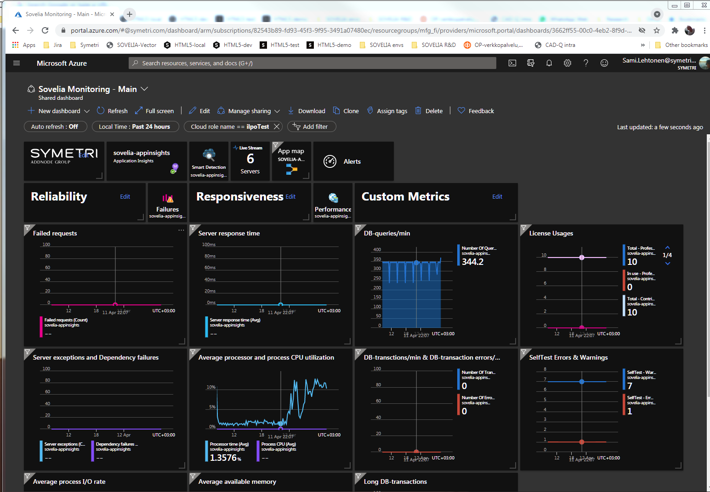
By displaying key metrics in an easy to understand, simple to use dashboard approach you can monitor all aspects of the Sovelia Core environment.
License usage - too few or too many?
Trends can be spotted and license needs assessed, and budgeted for, in a more understandable way avoiding any shortfalls in licensing, ie. delayed work and frustrated end users. It also works the other way, unused licenses could mean a reduction in the license count saving costs. Looking at key metrics around disk space on the server monitoring side and processor load, you could avoid bottlenecks that otherwise would not get spotted until it's too late.
Sovelia Monitor
Sovelia Monitor is an Application Performance Management (APM) system that observes the performance and efficiency of Sovelia Core. It collects performance-related data from Sovelia server and sends it to an Application Insights APM service (part of Microsoft Azure cloud computing services). Application Insights analyses and visualizes the data, giving real-time information about changes in performance and its possible exceptions.
Modern manufacturing leaders need better control over product data, changes, and documentation. This executive whitepaper explains how PLM creates a single source of truth across the product lifecycle, helping companies reduce risk, improve quality, accelerate change, and make better business decisions.
Sovelia AI Assistant provides contextual, customer-specific guidance directly in Sovelia Core, helping users work more efficiently in their own PLM environment.